Evaluating the 30 Alchemy Symbols Photoshop Stamp Brush Set for Digital Design
In the realm of digital graphic design, efficiency and aesthetic precision are paramount. Designers frequently seek tools that streamline workflow while maintaining high visual standards. One such tool gaining attention among illustrators, web designers, and print artists is the 30 Alchemy Symbols Photoshop Stamp Brush. This resource offers a curated collection of esoteric and historical iconography, packaged specifically for Adobe Photoshop environments ranging from CS2 to the latest Creative Cloud versions. Understanding the technical specifications, practical applications, and limitations of this brush set is essential for determining whether it aligns with your specific project requirements.
Understanding the Product Specifications
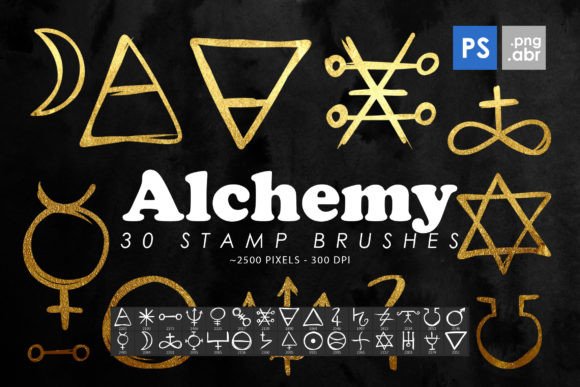
The core value of the 30 Alchemy Symbols Photoshop Stamp Brush lies in its dual-format delivery. The package includes thirty distinct .ABR files, which are native Photoshop brush presets, alongside thirty isolated .PNG images. This redundancy ensures compatibility across various workflows. Whether a designer prefers the dynamic application of a stamp brush or the static placement of a clipart element, the asset is readily available.
Resolution is a critical factor in professional design. These brushes and images are rendered at a size of 2000 to 2500 pixels. This high-resolution standard ensures that the symbols remain crisp and detailed when scaled for large-format prints, such as posters or banners, without pixelation. Conversely, the clarity allows for precise detailing in smaller web-based graphics. The inclusion of isolated PNGs means that each symbol has a transparent background, facilitating easy layering and compositing without the need for manual masking or background removal.
Practical Applications and Use Cases
The versatility of alchemical imagery extends beyond niche occult themes. These symbols possess a geometric and organic quality that appeals to various design sectors. Here are several scenarios where the 30 Alchemy Symbols Photoshop Stamp Brush serves as a strong fit:
- Brand Identity and Packaging: Brands focusing on natural ingredients, holistic wellness, or artisanal crafts often utilize alchemical symbols to convey heritage, transformation, and elemental balance. The high-resolution PNGs allow for seamless integration into label designs.
- Editorial and Book Cover Design: For publications involving history, science fiction, fantasy, or philosophy, these stamps provide immediate thematic context. Designers can quickly scatter elements to create textured backgrounds or focal points.
- Web and UI Elements: The isolated PNGs function effectively as decorative icons or dividers on websites. Their monochromatic nature allows for easy recoloring via CSS or image editing software to match specific brand palettes.
- Print Media and Posters: Event flyers for music festivals, art exhibitions, or theatrical productions often benefit from the mysterious and intricate aesthetic of alchemy. The stamp brushes enable rapid iteration of layout concepts.
Benefits of Using Stamp Brushes vs. Standard Clipart
While the included PNGs offer traditional clipart functionality, the .ABR brush files provide distinct advantages for dynamic composition. Stamp brushes allow for rapid placement with consistent sizing and rotation control. In Photoshop, users can adjust spacing, angle jitter, and size variation within the brush settings panel. This capability enables the creation of complex patterns, borders, or scattered backgrounds with minimal effort.
Furthermore, because these are raster-based stamps rather than vector paths, they retain a specific textural quality that can add depth to flat designs. When used with layer blending modes—such as Multiply or Overlay—these symbols can interact with underlying textures, creating a cohesive, integrated look that feels less like "stickers" and more like part of the artwork's fabric.
Considerations and Tradeoffs
Despite their utility, there are tradeoffs to consider when evaluating the 30 Alchemy Symbols Photoshop Stamp Brush. The primary limitation is the file format. As raster images, the symbols are not infinitely scalable like vector graphics (SVG or AI). While 2500 pixels is sufficient for most print and web applications, designers working on massive billboards or requiring infinite zoom capabilities may find the resolution limiting. In such cases, tracing the symbols in Illustrator or seeking vector alternatives might be necessary.
Additionally, the aesthetic is specific. Alchemy symbols are historically rooted and carry particular connotations. While versatile, they may not suit corporate, minimalist, or ultra-modern design briefs that require clean, abstract geometry. Designers must ensure that the symbolic meaning aligns with the client’s message to avoid unintended associations.
Compatibility is another factor. The product description notes support for Photoshop CS2 through CC. While this broad range is beneficial for users with older software, those using alternative programs like Procreate, Affinity Photo, or GIMP may need to rely solely on the PNG files. The .ABR format is proprietary to Adobe, limiting the direct use of the brush functionality in non-Adobe ecosystems.
Decision-Making Insights: Is This Set Right for You?
To determine if this asset bundle aligns with your goals, consider your current workflow and project scope. If you frequently work in Photoshop and require quick access to thematic icons, the convenience of having both brushes and PNGs is significant. The time saved by not having to source, isolate, and resize individual symbols from stock photography sites can justify the acquisition.
However, if your work primarily involves vector illustration or if you require editable paths for laser cutting or vinyl printing, this raster-based set may serve only as a reference rather than a final production asset. In such instances, you might prioritize vector libraries over Photoshop brushes.
It is also worth evaluating the uniqueness of the symbols. Alchemy is a public domain subject, and many free resources exist online. The value proposition here lies in the curation, consistency of style, and high-resolution preparation. If you value a cohesive look where all thirty symbols share similar line weights and stylistic traits, this pre-packaged set offers an advantage over mixing and matching disparate free downloads.
Integration Tips for Optimal Results
To maximize the utility of the 30 Alchemy Symbols Photoshop Stamp Brush, consider the following technical approaches:
- Layer Styles: Apply drop shadows, outer glows, or bevels to the stamp layers to create dimensionality. This is particularly effective for web buttons or game assets.
- Color Overlays: Use the "Color Overlay" layer style or adjustment layers to change the black-and-white symbols to match your project’s color scheme instantly.
- Texture Blending: Place the symbols over paper or grunge textures and use blending modes to make them appear stamped or printed, enhancing the vintage aesthetic.
- Custom Brush Settings: Experiment with the "Scattering" and "Angle Jitter" settings in the Brush Panel to create organic, hand-placed arrangements rather than rigid, repetitive patterns.
Conclusion
The 30 Alchemy Symbols Photoshop Stamp Brush represents a practical resource for designers seeking to incorporate esoteric and historical motifs into their work. Its strength lies in the combination of high-resolution raster assets and the flexibility of both brush and clipart formats. While it may not replace vector tools for large-scale signage or editable path requirements, it excels in digital composition, print media, and web design contexts where speed and aesthetic cohesion are valued. By understanding its technical constraints and leveraging its dual-format nature, designers can effectively integrate these symbols into a wide array of creative projects.